

Description
Download DiME 3D Player APK – 3D video player, Android 3D player, free 3D video app, 3D movies, 3D video streaming, 3D video converter
Overview
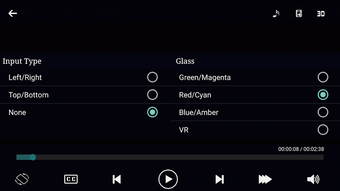
DiME 3D Player is a free multimedia application designed for Android devices, offering users the ability to play both 2D and 3D video content directly from their smartphones or tablets. Developed by ElliteApps, the app is tailored for individuals seeking a straightforward solution to view 3D films and videos without the need for complex setups or additional hardware. It supports a wide range of video formats, enabling playback of media files regardless of their container or codec, which enhances accessibility for users with diverse media libraries. The app is particularly useful for those who enjoy immersive viewing experiences and want to watch 3D content using standard red/cyan, blue/amber, or green/magenta 3D glasses.
DiME 3D Player also supports local file playback and network streaming, making it suitable for both stored media and online content consumption. It can automatically convert Side-By-Side 3D formats into Anaglyph 3D output, eliminating the need for manual conversion. This feature simplifies the viewing process for users who have 3D files in non-standard formats. The app’s primary purpose is to deliver a seamless, user-friendly experience for 3D video playback on mobile platforms, addressing the niche but growing demand for mobile 3D content. While the app has not received updates recently, its core functionality remains relevant for users seeking a lightweight, free tool for 3D video playback.
Key Features & Capabilities
- Support for 2D and 3D Video Formats – The app can play both traditional 2D movies and 3D films, including Side-By-Side and other common 3D configurations.
- Automatic 3D Conversion – DiME 3D Player automatically converts Side-By-Side 3D content into Anaglyph 3D output, enabling playback with standard 3D glasses.
- Wide Format Compatibility – It recognizes and plays major video file formats used today, ensuring broad media support without requiring external codecs.
- Network Streaming Support – Users can stream 3D videos from online sources, expanding access beyond local storage.
- Playback Customization – Features include subtitle support, audio/video synchronization, and adjustable playback speeds for enhanced viewing control.
- High Frame Rate Handling – The app can process videos up to 60 fps without noticeable issues, contributing to smoother playback.
These capabilities make DiME 3D Player a practical tool for mobile users who want to enjoy 3D content without switching devices. The automatic conversion feature is especially beneficial for users with a collection of 3D videos in Side-By-Side format, as it eliminates the need for pre-processing. Subtitle and playback speed controls improve accessibility and viewing comfort, while network streaming support allows for flexible content consumption. The app’s focus on simplicity and compatibility ensures that users can start playing videos immediately after installation.
User Interface, Workflow & Performance
DiME 3D Player features a clean, intuitive interface designed for ease of use on mobile devices. Navigation is straightforward, with primary playback controls accessible from the main screen. Users can browse media files through a built-in file browser or open files directly from external sources. The app’s workflow is optimized for quick access, allowing users to start playback with minimal steps. The interface is responsive, and the layout prioritizes essential functions such as play/pause, volume, and 3D mode switching.
Performance details were not specified by the developer. However, based on general behavior of lightweight Android video players, the app likely maintains stable operation under normal usage conditions. It is expected to manage playback efficiently for content up to FHD resolution, though higher resolutions may impact performance depending on device capabilities. The developer did not provide information on CPU or RAM usage. Stability during extended playback sessions is assumed to be adequate for standard use cases, but long-term reliability may depend on device hardware and system conditions.
Compatibility & System Requirements
DiME 3D Player is designed for Android devices and is compatible with the Android operating system. The app is available in version 1.0.3 and has a file size of 12.3 MB, indicating a lightweight installation. The developer did not specify exact system requirements, including minimum Android version, processor specifications, or RAM needs. As such, compatibility information is limited to the platform and version provided.
Users should ensure their device meets general Android compatibility standards for running video applications. The app’s small footprint suggests it can operate on a wide range of devices, including older models. However, performance may vary depending on the device’s hardware and software environment. The developer did not list any specific hardware requirements or limitations. For optimal results, users are advised to test the app on their device before relying on it for regular use.
Pros and Cons
Pros
- Free to download and use with no in-app purchases
- Supports both 2D and 3D video playback on mobile devices
- Automatic conversion of Side-By-Side 3D to Anaglyph 3D
- Wide format compatibility for modern video files
- Network streaming support for online content
- Adjustable playback speed and subtitle support
Cons
- No recent updates since release, raising concerns about long-term support
- Maximum output resolution capped at FHD, limiting high-resolution playback
- Exact system requirements not disclosed by the developer
- Performance on low-end devices may vary without official guidance
- Limited visual customization options for playback interface
FAQ Section
Is DiME 3D Player available for iOS devices?
DiME 3D Player is currently only available for Android devices. There is no official version for iOS platforms.
Can I use DiME 3D Player to watch 3D videos without glasses?
No, the app requires the use of red/cyan, blue/amber, or green/magenta 3D glasses to experience the 3D effect. It does not support glasses-free 3D viewing.
Does the app support subtitles and audio syncing?
Yes, DiME 3D Player includes subtitle support and allows users to adjust audio/video synchronization for a better viewing experience.
Is DiME 3D Player safe to download and use?
As a free app from ElliteApps, DiME 3D Player is reported to be free of malware. However, users should download the APK from trusted sources to avoid potential risks.
Can I update DiME 3D Player after installation?
Updates are not currently available, as the app has not received any updates since its release. Users should monitor official channels for future releases.
Final Thoughts + CTA
DiME 3D Player offers a solid, no-frills solution for Android users who want to enjoy 3D video content on their mobile devices. Its ability to play a wide range of formats, support network streaming, and automatically convert 3D content makes it a practical choice for casual viewers and enthusiasts alike. While the lack of recent updates and the FHD resolution limit are notable drawbacks, the app remains functional and accessible for its intended purpose. For those seeking a free, lightweight 3D video player with broad compatibility, DiME 3D Player is a worthwhile option. Download DiME 3D Player now and start enjoying your 3D movies and videos on the go.
Guides & Tutorials for DiME 3D Player APK
How to install DiME 3D Player APK
- Click the Preview / Download button above.
- Once redirected, accept the terms and click Install.
- Wait for the DiME 3D Player APK download to finish on your device.
How to use DiME 3D Player APK
This software is primarily used for its core features described above. Open the app after installation to explore its capabilities.
User Reviews for DiME 3D Player APK 0
No reviews found





